In order to view all Knowledge Base Articles, support guides, users must be logged into the Panacea Freshdesk. This is a separate login from the main Panacea portal.
To log in and view all Knowledge Base articles, please:
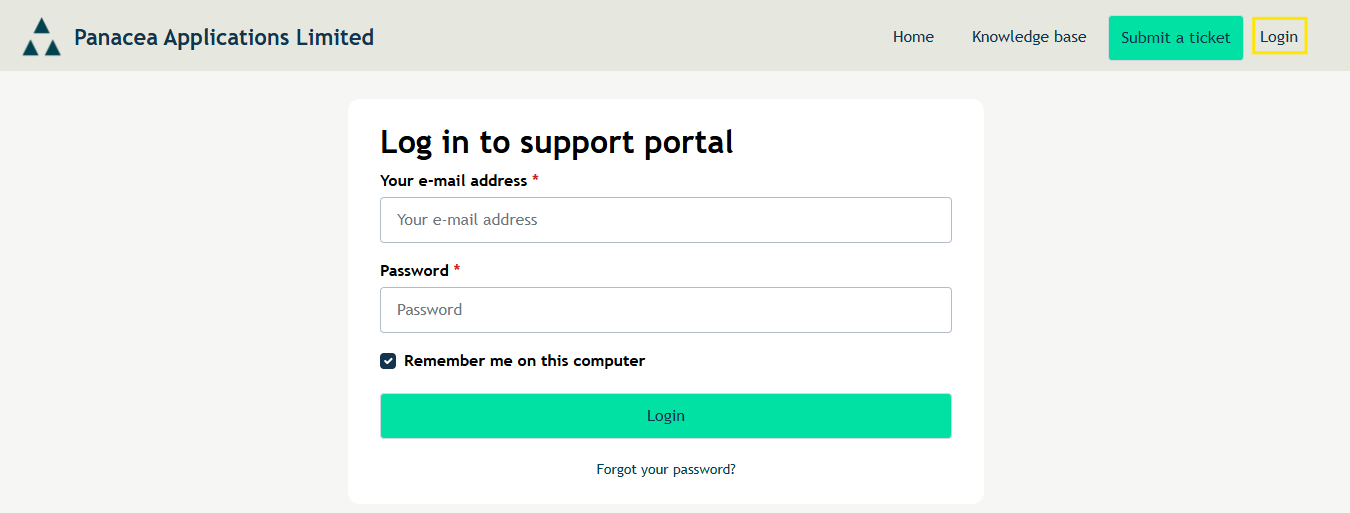
- Click Login (top right hand corner) on Freshdesk/Knowledge Base.
- Provide your Freshdesk email address and password and click Login
- If this is your first time accessing our Freshdesk or you cannot remember your password, please click Forgot your password?
- Provide your email address - this should be the same email address you use to access the portal. Click Reset my password
- You will get an email from Panacea Applications Limited (support@panacea-software.com) to reset your password.
Was this article helpful?
That’s Great!
Thank you for your feedback
Sorry! We couldn't be helpful
Thank you for your feedback
Feedback sent
We appreciate your effort and will try to fix the article