In order to access the relevant Panacea site, all users need to be registered with an account.
New users can request to create their own account via the login screen.
- Click on the Request a new account button on the bottom of the login page where you will be asked to validate your email
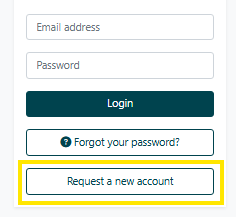
- If the email provided does not belong to a current contact, you will receive an email to continue your account creation/request
- Complete the form, confirm you are not a robot and click send request.
- The Site Administrators will then review your account request and will process accordingly.
- If accepted, you will receive an email allowing you to create a password to access the site.
If you are a supplier registering on a site that is used for Procurement / Tenders / Contract Management, please refer to this specialist guide as you will be able to self-service your registration.
N.B. If your chosen password fails to comply with your organisation's security standards you will be presented outlining the minimum password requirements so that you may try again.
If your password token expires before you get a chance to create your login details, you can click on Request a new Password Reset Token.
Was this article helpful?
That’s Great!
Thank you for your feedback
Sorry! We couldn't be helpful
Thank you for your feedback
Feedback sent
We appreciate your effort and will try to fix the article